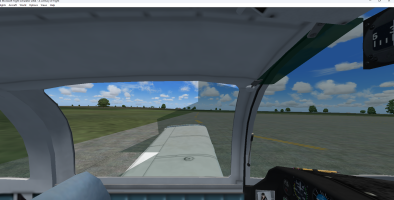
Piglet's Grumman AA-5B issue

splatz

Members +
Would anybody know why I am having issues with the glass in the VC of the Grumman AA-5B? Also have the Grumman AA-5A installed and there is no problem with the glass in the VC at all. Have copied the glass file from the AA-5A into the AA-5B texture folder and there is no change at all.


grumman aa-5a glass.png
 
So, you're saying the inner glass texture used to work but now it doesn't? :unsure:
I can tell you're running FS9 but everything else will be guess-work.

-It might be your OS, you didn't mention what you're running but it might be due to an update.

-It might be due to an update or a missed update to your graphics drivers. You didn't mention that, so I'm guessing again.

-It might be due to a conflict with some new scenery textures, again I'm guessing again.

-Something might have corrupted that texture file. Its rare, but at this point any guess is valid. :unsure:

:geek:

Figure out what has changed since that inner glass texture had no problems. Do other aircraft that use inner glass textures have the same issue?

A little more info would be helpful. :wiggle:

Here's an old, but good, basic tutorial on troubleshooting FS:

 
Last edited:
I seem to remember piglets Bronco doing the same, go to settings-display- aircraft and make sure you tick the reflections box
 
So, you're saying the inner glass texture used to work but now it doesn't? :unsure:
I can tell you're running FS9 but everything else will be guess-work.

-It might be your OS, you didn't mention what you're running but it might be due to an update.

-It might be due to an update or a missed update to your graphics drivers. You didn't mention that, so I'm guessing again.

-It might be due to a conflict with some new scenery textures, again I'm guessing again.

-Something might have corrupted that texture file. Its rare, but at this point any guess is valid. :unsure:

:geek:

Figure out what has changed since that inner glass texture had no problems. Do other aircraft that use inner glass textures have the same issue?

A little more info would be helpful. :wiggle:

Currently running Windows 11. Just using onboard graphics at the moment and drivers were updated a few days ago. Don't have any addon scenery installed at all. Just have a few freeware aircraft installed.
 
You may also want to try some other "inner glass" textures from other aircraft to see if it makes a difference. :wiggle:
The other thing I would check is the settings on your new install. Try turning "reflections" off and on again?

My gut says its in the MDL file but you never know.. :ernaehrung004:
 
Checking the reflections setting in the aircraft settings has solved the problem with the glass with the aircraft.

Thanks to everyone that helped out!
 
reflections is a funny one, some aircraft look great with it checked and some dont need it, its one of those things to bear in mind if an aircraft doesn't look right in your sim
 
Back
Top