
-
Please see the most recent updates in the "Where did the .com name go?" thread. Posts number 16 and 17.
-
IMPORTANT DOWNLOADING INFORMATION - ALL MEMBERS PLEASE READ
Please see this thread for updates. Update Thread
SOH ADMINISTRATION
You are using an out of date browser. It may not display this or other websites correctly.
You should upgrade or use an alternative browser.
You should upgrade or use an alternative browser.
Duplicate USS Midway carriers
- Thread starter udidwht
- Start date

tiger1962
SOH-CM-2026
Did you also remake the Layout.json with MSFSLayoutGenerator.exe? I always forget to do that myself...Did that after renaming it to .disabled and it had no effect.
Wasn't aware of that. How exactly?Did you also remake the Layout.json with MSFSLayoutGenerator.exe? I always forget to do that myself...
tiger1962
SOH-CM-2026
You'll need the freeware MSFSLayoutGenerator.exe from Github here.
Click on the blue MSFSLayoutGenerator.exe text to download it, then copy or move it into your KSAN folder with the layout.json file which you want to re-generate.
Drag and drop the layout.json file over the MSFSLayoutGenerator.exe icon.
A console window will appear and then close.
Your new layout.json file has been created and the static carrier should now be removed from the scenery.
Click on the blue MSFSLayoutGenerator.exe text to download it, then copy or move it into your KSAN folder with the layout.json file which you want to re-generate.
Drag and drop the layout.json file over the MSFSLayoutGenerator.exe icon.
A console window will appear and then close.
Your new layout.json file has been created and the static carrier should now be removed from the scenery.
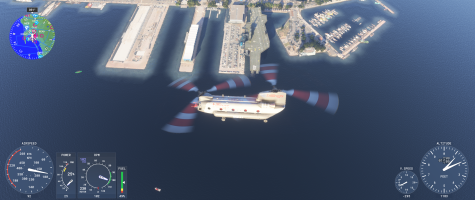
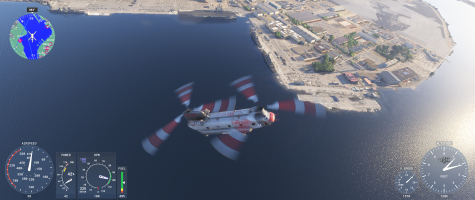
I tested by removing Miltech Supercarrier and the Midway is still present. it appears it may be from CU 13. I reported the carrier at North Island on the bug thread on the MSFS official site.The carrier docked at Midway could be a Miltech model. The North Island one looks like part of the photoscenery from that angle, if it is then maybe you can find some third party scenery which replaces that whole area.