
Panel Additions for Capt Kurt's B5N2 Kate
I resized the main B5N panel to make in WIN7+ safe, & added:
A Concorde GPS icon gauge to the 2D main panel (to select bomb scope view). I can't find a way of accessing the downard view by any other way than this.
I added a fixed window (38) viewing down for the bomb scope
I changed the location of the rear view (num pad 2) to mimic the view from the rear gunner (fixed window 33)
To use the bomb scope view:
Select the 2D main panel. Click on the GPS icon to go to bomb scope view.
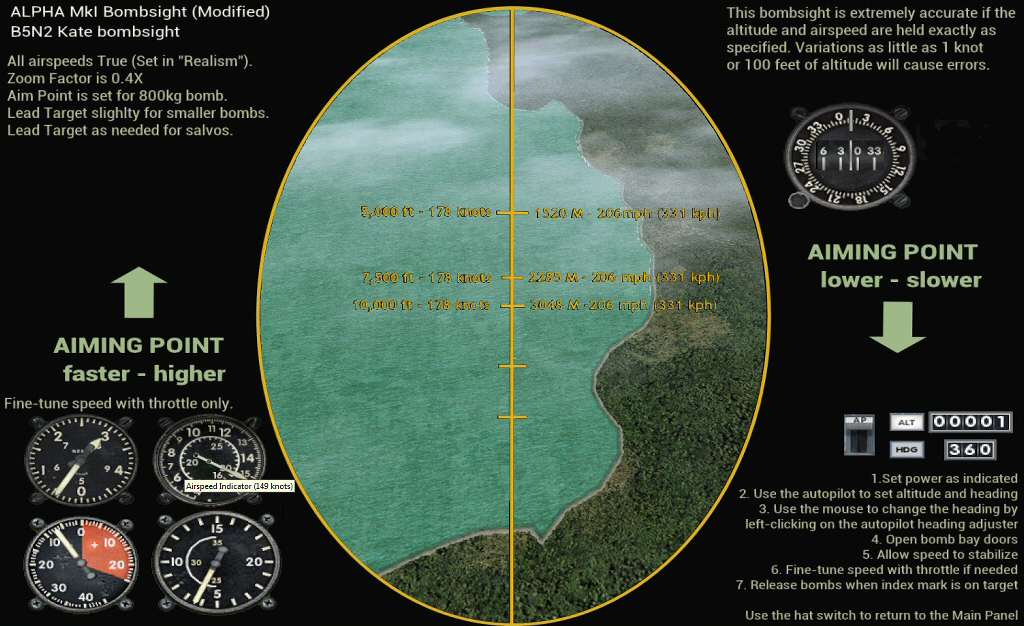
The bomb scope is just the Alpha bombsight window with changes for the B5N2
To return to normal cockpit view just F4 your way back.
Also included is a mdl with a slight shine to it (done using MDLmat).
Credits:
Captain Kurt for the new B5N2 Kate
UncleTgt
SEP2026
I resized the main B5N panel to make in WIN7+ safe, & added:
A Concorde GPS icon gauge to the 2D main panel (to select bomb scope view). I can't find a way of accessing the downard view by any other way than this.
I added a fixed window (38) viewing down for the bomb scope
I changed the location of the rear view (num pad 2) to mimic the view from the rear gunner (fixed window 33)
To use the bomb scope view:
Select the 2D main panel. Click on the GPS icon to go to bomb scope view.
The bomb scope is just the Alpha bombsight window with changes for the B5N2
To return to normal cockpit view just F4 your way back.
Also included is a mdl with a slight shine to it (done using MDLmat).
Credits:
Captain Kurt for the new B5N2 Kate
UncleTgt
SEP2026


