
-
Please see the most recent updates in the "Where did the .com name go?" thread. Posts number 16 and 17.
-
IMPORTANT DOWNLOADING INFORMATION - ALL MEMBERS PLEASE READ
Please see this thread for updates. Update Thread
SOH ADMINISTRATION
You are using an out of date browser. It may not display this or other websites correctly.
You should upgrade or use an alternative browser.
You should upgrade or use an alternative browser.
Is there an easy way to convert Orbiter 5.1 scenery into a usable FS2004 format?
- Thread starter huub vink
- Start date
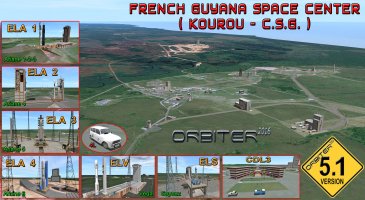


The general stucture has some similarities. The objexts seem to be in a .msh format and the textures are in .dds format, It seems that .ini files put the structures in place.
So not stopped by any knowledge knowledge I thought, when it is possible to convert the .msh (mesh) file and .ini into .bgl and convert the .dds file into (dtx3) .bmp there might be a change to have this scenery working in FS2004.
While writing this, I realise that the the system to indicte a position is most likely completely different as well. So the best achievable is perhaps to convert the structures, but it will most likely be impossible to save or convert the positioning.
Its a pity as the way FS2004 or even FSX looks in that area is completely different than reality. The l;aunch site is in the savanne and not in the rain forest.
Cheers,
Huub
So not stopped by any knowledge knowledge I thought, when it is possible to convert the .msh (mesh) file and .ini into .bgl and convert the .dds file into (dtx3) .bmp there might be a change to have this scenery working in FS2004.
While writing this, I realise that the the system to indicte a position is most likely completely different as well. So the best achievable is perhaps to convert the structures, but it will most likely be impossible to save or convert the positioning.
Its a pity as the way FS2004 or even FSX looks in that area is completely different than reality. The l;aunch site is in the savanne and not in the rain forest.
Cheers,
Huub
Motormouse
SOH-CM-2025
Simviation has a Kourou scenery Huub
Ttfn
Pete
Ttfn
Pete
Thanks Pete, I had missed that!Simviation has a Kourou scenery Huub
Ttfn
Pete
Huub

wolfebee89
SOH-CM-2024
on a related note, if Cape Canaveral / NASA is of interest, then the freeware Ron Jeffers' Shuttle Launch 06 ought to prove interesting: https://library.avsim.net/extsearch?extended_search[name]=shuttle&extended_search[filename]=&extended_search[author]=jeffers&extended_search[category]=44
and going the payware route - Aerosoft Cape Canaveral X for FS2004/FSX proves rather gratifying and still on sale: https://www.aerosoft.com/en/shop/fl...neries/fsx-north-america/267/cape-canaveral-x
cheers!
and going the payware route - Aerosoft Cape Canaveral X for FS2004/FSX proves rather gratifying and still on sale: https://www.aerosoft.com/en/shop/fl...neries/fsx-north-america/267/cape-canaveral-x
cheers!
wolfebee89
SOH-CM-2024
so to answer the original query @huub vink the conversion is somewhat involved:
in brief, per https://www.orbiter-forum.com/resources/mesh-wizard-1-9d.2746/ and https://www.scenerydesign.org/modelconverterx/ you'd have to, essentially, export the relevant orbiter .msh scenery object file to an intermediary MCX supported wavefront *.OBJ file format. Subsequently, you'd have to import said intermediate scenery OBJ file into MCX, and after making the relevant requisite adjustments, finally export the OBJ object as scenery BGL for use in FS2004/X; together naturally, with the relevant texture/UV mapping and texture conversion from DDS to FS2004 supported bitmaps; there may also be minor issues of scales and geo-positioning, given the underlying variations in world models between Orbiter and MSFS, and that too would have to be taken into account in MCX prior to export to said FS2004/X scenery BGL file format
cheers
in brief, per https://www.orbiter-forum.com/resources/mesh-wizard-1-9d.2746/ and https://www.scenerydesign.org/modelconverterx/ you'd have to, essentially, export the relevant orbiter .msh scenery object file to an intermediary MCX supported wavefront *.OBJ file format. Subsequently, you'd have to import said intermediate scenery OBJ file into MCX, and after making the relevant requisite adjustments, finally export the OBJ object as scenery BGL for use in FS2004/X; together naturally, with the relevant texture/UV mapping and texture conversion from DDS to FS2004 supported bitmaps; there may also be minor issues of scales and geo-positioning, given the underlying variations in world models between Orbiter and MSFS, and that too would have to be taken into account in MCX prior to export to said FS2004/X scenery BGL file format
cheers
Last edited:
Thanks for your research and very complete answer. However I'm afraid it sounds a bit too complecated for a simple man like me.....so to answer the original query @huub vink the conversion is somewhat involved:
in brief, per https://www.orbiter-forum.com/resources/mesh-wizard-1-9d.2746/ and https://www.scenerydesign.org/modelconverterx/ you'd have to, essentially, export the relevant orbiter .msh scenery object file to an intermediary MCX supported wavefront *.OBJ file format. Subsequently, you'd have to import said intermediate scenery OBJ file into MCX, and after making the relevant requisite adjustments, finally export the OBJ object as scenery BGL for use in FS2004/X; together naturally, with the relevant texture/UV mapping and texture conversion from DDS to FS2004 supported bitmaps; there may also be minor issues of scales and geo-positioning, given the underlying variations in world models between Orbiter and MSFS, and that too would have to be taken into account in MCX prior to export to said FS2004/X scenery BGL file format
cheers
Huub