• Please see the most recent updates in the "Where did the .com name go?" thread. Posts number 16 and 17.

    Post 16 Update

    Post 17 Warning old domain name stealing credentials

  • Special Server Maintenance

    Just when you think you have everything running some what better...

    You get a message from the Hosting company. Short story they need to move us to a new server. I have been working with them to plan a good date for all concerned. Here is what we have come up with as a schedule.

    1. November 4th 17:00 -5UTC shut off the forums and start backup proceedures. During this time there will be no access to the forums or the Resource Section.
    2. November 5th Continue with Backups and download same until complete.
    3. November 6th 7:00 turn over server to hosting company to move system to new server
    4. November 7th - 8th restore backups and upgrade forum software.

    If all goes well we should be back online on November 8th.

    To keep you updated we will post updates on AVSIM forums.

    Thank you for your support.

VF-19 Satan's Kittens 2025

VF-19 Satan's Kittens 2025 2025-05-13

No permission to download

Captain Kurt

Administrator
Staff member
Captain Kurt submitted a new resource:

VF-19 Satan's Kittens 2025 - VF-19 Satan's Kittens 2025

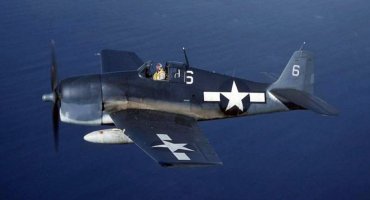
A historical 34 mission auto loading campaign for USN Fighting Squadron VF-19 "Satan's Kittens" aboard the USS Lexington CV16 during the last half of 1944. You'll fly the F6F-3 and F6F-5 Hellcat against Japan over Guam, Okinawa, Formosa, the Philippines and Leyte Gulf. This is the 2025 updated campaign featuring the latest aircraft models, ship models, scenery, and uses Rumbaflappy’s mesh terrain. The auto installers load and arrange all of this rather than having you, the player, to do it...

Read more about this resource...VF-19.jpg
 
I saw a read me on the bomb blasts but what about the rest of the effects that come with the package. Do they improve frame rates or do they provide a better visual experience?
 
Thank you Kurt! I am slowly working on a similar campaign - a remake of my USS Essex CV9 work - and am floating around the Philippine Sea engagement. I really look forward to installing and flying this work of yours.

Cheers:
Greg
 
Thank you Capt. Kurt!
Really nice campaign.
One thing, In mission #8, Bacolod airfield back ground is not show up. GSL objects is showing up correctlly.
I checked if Maskrider's scenery is installed correctly. It's yes, but it seems Bacolod is not inclded in his scenery pack.
Am I missing anything?
 
Bacolod was not an airfield at all. It was a large clearing with the Japanese aircraft dispersed under the trees surrounding the clearing.
 
Hmm... I need some help. I have loaded the campaign twice. The second time step by step, to the letter of the installation instructions. With each install, the sim would not start completely. A description of the fault is: the sim tries to open goes to a black screen, then crashes down to my system tray. When I open the tray icon, the Home menu is opened. But when I click one of the tabs, (Campaigns, Free Flight, etc.) the window crashes back to the tray icon . Task Manager/end task is the only way to close the icon - I cannot close it with my mouse. :dizzy:

FYI: I am running a laptop with original installed loading of Windows 11 with all the current updates. All my other installs run normally without problems so I am pretty sure the problem is not Win 11. As I said above, I used a clean install and followed Kurt's instructions precisely and on inspecting the files, everything appears to be installed in place and in the right folders. Ideas? :banghead:
 
Don't know off the top of my head. I'll see if I can replicate or just find the problem. I'll get back here. :confused:
 
Hi SW

Try Kevin's suggestion and see if it works. There a lot that can be deleted with no issues.

Otherwise, I am unable to duplicate or find what is causing this. I am still running XP because of using older development tools. I don't have a Windows 11 system to check if the operating system interaction might be a cause.

One thought. Is CFS2 generating an error txt file in the main CFS2 folder?

Anyone else experiencing this issue?
 
Greg

That should be fine. You can also get rid of a lot of the LW trees. There are a lot that aren't used - you can tell from the names which are not likely to be in the sceneries.
 
[Mission file error]
error=Unable to init unit 1000
title=atlanta test 1
filename=C:\CFS\CFS2 V-Install\Combat Flight Simulator 2\MISSIONS\atlanta test 1
 
Greg, unless you're actually trying to fly the atlanta test 1 mission, that shouldn't crash the sim.

If you have these small programs, it might be worth running CleanOutCDPFiles and CleanOutFilelistDAT.

How big is your mdlnames.txt file? The maximum size is about 37kb.
 
Back
Top