
-
Please see the most recent updates in the "Where did the .com name go?" thread. Posts number 16 and 17.
-
Special Server Maintenance
Just when you think you have everything running some what better...
You get a message from the Hosting company. Short story they need to move us to a new server. I have been working with them to plan a good date for all concerned. Here is what we have come up with as a schedule.
- November 4th 17:00 -5UTC shut off the forums and start backup proceedures. During this time there will be no access to the forums or the Resource Section.
- November 5th Continue with Backups and download same until complete.
- November 6th 7:00 turn over server to hosting company to move system to new server
- November 7th - 8th restore backups and upgrade forum software.
If all goes well we should be back online on November 8th.
To keep you updated we will post updates on AVSIM forums.
Thank you for your support.
You are using an out of date browser. It may not display this or other websites correctly.
You should upgrade or use an alternative browser.
You should upgrade or use an alternative browser.
Windows 10/11 snafu / content thread
- Thread starter Steve2112
- Start date
-
- Tags
- cfs2 windows 11
Flying Is Fun
Members +
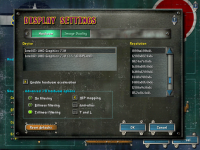

Huh. Hardware acceleration has been grayed out for people on Win10 unless the card was a older Win7 era card. Do you have DxWrapper or DDrawCompat installed? In the resolution do you have any that end in x32? If you can find 1024x768x32 please try that. 1024x768 is the resolution. 32 is the color depth.
ElsnerMarkus
Members +
I bought a 32 inch monitor from peaq, the PMO S323 IQSC,
I wanted to manually edit the cfs2 cfg to adjust the resolution for the 2560x1440 window mode.
But somehow it doesn't work, the window goes black, can anyone help me?
[DISPLAY]
Device=Radeon RX 5500 XT
Mode=2560x1440x32
Dither=0
Filter=1
TriLinear=0
MipMap=1
AntiAlias=1
HWTnL=1
Disable=0
I wanted to manually edit the cfs2 cfg to adjust the resolution for the 2560x1440 window mode.
But somehow it doesn't work, the window goes black, can anyone help me?
[DISPLAY]
Device=Radeon RX 5500 XT
Mode=2560x1440x32
Dither=0
Filter=1
TriLinear=0
MipMap=1
AntiAlias=1
HWTnL=1
Disable=0


Shadow Wolf 07
SOH-CM-2025
Hi Allen:
I just set up CFS2 in a new Windows 11 laptop with a similar problem. I installed it in: C/CFS/CFS2 in a windowed mode setup. It first would immediately CTD as soon as I started Free Flight or tried to change aircraft in FF. After adding the ddraw.dll you suggested above, Free Flight starts me on the runway, but before I can start engine, it CTDs! Changing player aircraft still CTDs immediately after I open this option, even after substituting the stock Zero in the CFS2.cfg.
BTW: my Display parameters read the same as yours.
Cheers:
SW07
I just set up CFS2 in a new Windows 11 laptop with a similar problem. I installed it in: C/CFS/CFS2 in a windowed mode setup. It first would immediately CTD as soon as I started Free Flight or tried to change aircraft in FF. After adding the ddraw.dll you suggested above, Free Flight starts me on the runway, but before I can start engine, it CTDs! Changing player aircraft still CTDs immediately after I open this option, even after substituting the stock Zero in the CFS2.cfg.
BTW: my Display parameters read the same as yours.
Cheers:
SW07
This is strange. Now twice that Win11 PC has hardware acceleration was enabled for me by default yet CTDs soon as anything 3D is on screen.
The only thing I can think of is that DirectX support for anything below 9 is now gone with Win11 (CFS2 is DX7). The DirectX9.0c install had drivers .ect going back to DX6 but this thread says you can't install DirectX9.0c https://answers.microsoft.com/en-us/windows/forum/all/windows-11-and-directx90c-support/0da28157-1791-4d55-bb8f-6cdac90368a6 on Win11.
Instead they are are tell people to install the directx_Jun2010_redist.exe Maybe try that?
The only thing I can think of is that DirectX support for anything below 9 is now gone with Win11 (CFS2 is DX7). The DirectX9.0c install had drivers .ect going back to DX6 but this thread says you can't install DirectX9.0c https://answers.microsoft.com/en-us/windows/forum/all/windows-11-and-directx90c-support/0da28157-1791-4d55-bb8f-6cdac90368a6 on Win11.
Instead they are are tell people to install the directx_Jun2010_redist.exe Maybe try that?
Last edited:
Hi guys; I will throw a little bit into this conversation that may or may not pertain. I have a new laptop that runs Win 11 . I recently tried to copy some old CFS2 files on thumb drives onto a new larger one. It took forever and then I noticed some strange messages concerning the files. It seems Win 11 wasn't recognizing some file extensions, ie: .exe, bmp and changing them! Completely screwed up all files , even my old ones ! So look at your game setup carefully and make sure this isn't what happened to you.
Just my two cents on this. BTW ; I now am trying to resurrect an OLD WINXP SP3 to get going again..
Just my two cents on this. BTW ; I now am trying to resurrect an OLD WINXP SP3 to get going again..
Shadow Wolf 07
SOH-CM-2025
Hi Fibber:
I checked and my aircraft and ship .bmps are still .bmps ant the Info jpegs are still the same. As for .exes they work too.
I checked and my aircraft and ship .bmps are still .bmps ant the Info jpegs are still the same. As for .exes they work too.
... this may be a dead horse issue but has anyone tried any of these things on a site from 2023 ? This pertains to MSFS and found it while bored cruising.
This is the site ; https://windowsreport.com/windows-11-flight-simulator-issues/
I know there was a looooooong post on this but it appears to be buried and was wondering ,before I mess up this MS bomb of Win 11, if it works..
This is the site ; https://windowsreport.com/windows-11-flight-simulator-issues/
I know there was a looooooong post on this but it appears to be buried and was wondering ,before I mess up this MS bomb of Win 11, if it works..

Dirtman
SOH-CM-2022
Yo Fibber; Thanks for the info!
I've been trying to assist Shadow Wolf in getting CFS2 to run properly on his new HP Win11 Home laptop.
What I do know for sure:
1) I have installed Win11 Pro on older hardware (AMD FX-8370, NVIDIA GTX 750 Ti) and CFS2 runs 100%, no issues at all.
- loaded with a modified Win11 .iso to remove requirements for TPM etc.
2) New PC's bought with factory installed Win11 seem to not work properly with CFS2.
Still unsure of what is the root cause.
I've been trying to assist Shadow Wolf in getting CFS2 to run properly on his new HP Win11 Home laptop.
What I do know for sure:
1) I have installed Win11 Pro on older hardware (AMD FX-8370, NVIDIA GTX 750 Ti) and CFS2 runs 100%, no issues at all.
- loaded with a modified Win11 .iso to remove requirements for TPM etc.
2) New PC's bought with factory installed Win11 seem to not work properly with CFS2.
Still unsure of what is the root cause.
Shadow Wolf 07
SOH-CM-2025
I will check out that article, Fibber. Right now I'm committed to getting, my NAS, TV, home server, laptop and my home network to function together as desired before my eye/cataract surgery next week. Then I'll get back to my CFS2 struggles.Yo Fibber; Thanks for the info!
I've been trying to assist Shadow Wolf in getting CFS2 to run properly on his new HP Win11 Home laptop.
What I do know for sure:
1) I have installed Win11 Pro on older hardware (AMD FX-8370, NVIDIA GTX 750 Ti) and CFS2 runs 100%, no issues at all.
- loaded with a modified Win11 .iso to remove requirements for TPM etc.
2) New PC's bought with factory installed Win11 seem to not work properly with CFS2.
Still unsure of what is the root cause.

Cheers:
SW07

SW;07 ; Hope all goes well with that on all fronts. I was recently told that I may need the surgery also but I lucked out (?) in that the surgeon I choose checked it all out and decided to go with drops and see what happens. So far the drops have worked ! Another thing was that one of the doctors who examined me had did some stints in Laos as a snake eater medic and also taught in Quatar university for awhile. (13 yrs) after leaving that life. So no surgery for me for now. Again GOOD LUCK !
Dirtman; you more than welcome ! Let us know if it helps. I was also wondering if somewhere in the Win11 code is a cmd to exclude legacy MS programs. Had it happen to me on Win XP and MS Office365. It worked well after the subscription expired until a "update" stopped it!
Dirtman; you more than welcome ! Let us know if it helps. I was also wondering if somewhere in the Win11 code is a cmd to exclude legacy MS programs. Had it happen to me on Win XP and MS Office365. It worked well after the subscription expired until a "update" stopped it!
Shadow Wolf 07
SOH-CM-2025
I can't find the thread where I mentioned it but FYI: my cataract surgery on the left eye went so well that I'm actually looking forward to the right eye surgery next month. I thank you all for your well wishes and prayers.
On topic: I still cannot run CFS2 on my win11 laptop, facing the same CTD issues. I have been using transfers of saved installs for my testing. I next plan to dust off my disks and install the sim from them onto the new computer. If that fails to work, I'll simply finish the Saratoga campaign on my win10 laptop.
With all the new ships, objects, and scenery coming out lately, I may do a total re-work as I flight test. Still hoping for someone out there to come up with a solution for my problem.
Cheers:
Shadow Wolf 07
On topic: I still cannot run CFS2 on my win11 laptop, facing the same CTD issues. I have been using transfers of saved installs for my testing. I next plan to dust off my disks and install the sim from them onto the new computer. If that fails to work, I'll simply finish the Saratoga campaign on my win10 laptop.
With all the new ships, objects, and scenery coming out lately, I may do a total re-work as I flight test. Still hoping for someone out there to come up with a solution for my problem.
Cheers:
Shadow Wolf 07
Shadow Wolf 07
SOH-CM-2025
Fibber: Everything went very well. Thank you for your well wishes and prayers. If I can't sort out this win11 issue, I will have to complete my project on my old win10 laptop. Gonna try cfs2 on win11 by loading the install from the disk and see if she runs... 

SdC
Members +
Hi, I got it running on Lenovo factory install Windows 11 with TPM enabled without any issues, just with the DDrawCompat + nocd fixes and the "Legacy components > DirectPlay" Windows Feature enabled. I did install cfs2 with the original setup files custom install, into a folder outside of the UAC protected zone (def. don't put it in "Program Files" or "Program Files(x86)".
The article linked in OP is just a generic clickbait site that always tops the google results whatever program name you put in there with the generic MS answer-to-everything.
I had previously installed the DirectX Runtime to fix compatibility issue for another game, that may be relevant:
The article linked in OP is just a generic clickbait site that always tops the google results whatever program name you put in there with the generic MS answer-to-everything.
I had previously installed the DirectX Runtime to fix compatibility issue for another game, that may be relevant:
Download DirectX End-User Runtime Web Installer from Official Microsoft Download Center
The Microsoft DirectX® End-User Runtime installs a number of runtime libraries from the legacy DirectX SDK for some games that use D3DX9, D3DX10, D3DX11, XAudio 2.7, XInput 1.3, XACT, and/or Managed DirectX 1.1. Note that this package does not modify the DirectX Runtime installed on your Windows...
www.microsoft.com
Last edited:
Sdc;
Thanks for that info. Like I posted only found that site while cruising and purposely asked if anyone had tried any of it. I was NOT vouching for the veracity of the site. Quick question as this Win 11 has ne befuddled, what is TPM ( and where to enable it) and how to fix the DDrawCompat (nocd I understand !) I can't find the Legacy components feature. Like I posted, I am like a blind man lost in a minefield here. BTW , my new computer is a Lenovo Win 11 factory install laptop.
Thanks for that info. Like I posted only found that site while cruising and purposely asked if anyone had tried any of it. I was NOT vouching for the veracity of the site. Quick question as this Win 11 has ne befuddled, what is TPM ( and where to enable it) and how to fix the DDrawCompat (nocd I understand !) I can't find the Legacy components feature. Like I posted, I am like a blind man lost in a minefield here. BTW , my new computer is a Lenovo Win 11 factory install laptop.
SdC
Members +
Sdc;
Thanks for that info. Like I posted only found that site while cruising and purposely asked if anyone had tried any of it. I was NOT vouching for the veracity of the site. Quick question as this Win 11 has ne befuddled, what is TPM ( and where to enable it) and how to fix the DDrawCompat (nocd I understand !) I can't find the Legacy components feature. Like I posted, I am like a blind man lost in a minefield here. BTW , my new computer is a Lenovo Win 11 factory install laptop.
- TPM: Trusted Platform Module; a set of chips on your motherboard that is supposed to govern security aspects of the installed OS/drivers/apps, like storing the secret keys for disk encryption, verify identities and stuff like that. It's been on new computers for over 10 years, so it is on your new laptop and it is enabled; leave it on and forget about it. It is now required by Windows. If you try to install Windows 11 on a PC that doesn't have it, you have to do some "hacking" and if you switch it off, you won't have a good time.
- DDDrawCompat: go to https://github.com/narzoul/DDrawCompat/releases. Under the list of changes, there's an Assets button, click on that to expand. Then in the list of files it shows, download the ZIP file that only has the Version number appended and nothing else (currently it's DDrawCompat-v0.5.3.zip ) That has only the file ddraw.dll in it; put that in the root of your CFS2 folder, next to your "nocd" file .
- DirectPlay:
- Search for "windows features" in the Taskbar search box.
- Click on "Turn Windows features on or off".
- Find "Legacy Components" and click the plus icon.
- Tick the "DirectPlay" option.
- Click OK and restart your computer to save and activate the changes
SdC
Members +
It's been rock-solid for me so far, finger crossed, knock on wood, for about 12h in-game time at 3440×1440, just trying some scenery add-ons and quick combat.My experience was that DDrawCompat v0.5.1 made CFS2 unstable for me with Win10. Maybe v0.5.3 and CFS2 is more stable.
I'm curious if having the DirectX Runtime installed makes a difference here as well.
I read in other threads that people had crash when changing plane in-flight, that doesn't happen to me either.