
-
Please see the most recent updates in the "Where did the .com name go?" thread. Posts number 16 and 17.
-
Special Server Maintenance
Just when you think you have everything running some what better...
You get a message from the Hosting company. Short story they need to move us to a new server. I have been working with them to plan a good date for all concerned. Here is what we have come up with as a schedule.
- November 4th 17:00 -5UTC shut off the forums and start backup proceedures. During this time there will be no access to the forums or the Resource Section.
- November 5th Continue with Backups and download same until complete.
- November 6th 7:00 turn over server to hosting company to move system to new server
- November 7th - 8th restore backups and upgrade forum software.
If all goes well we should be back online on November 8th.
To keep you updated we will post updates on AVSIM forums.
Thank you for your support.
You are using an out of date browser. It may not display this or other websites correctly.
You should upgrade or use an alternative browser.
You should upgrade or use an alternative browser.
Mmm nice shot.Against the wind


Mach3DS
Charter Member
So I restarted from scratch, after I found something that worked...up to this point I was just making destructive adjustments to the .dds files. So this morning I remade them into PSDs using the .dds files and then added adjustment layers etc. to get back to the look I was going for. In the process I discovered that there are significant of what looks like errors in the 3D mesh of the model?? Looks like there may be numerous places where the maybe the vertices are inverted? You can tell this is so, from the way the reflections seem to randomly become inverted to the direction they should be going. It's not readily apparent with non-metallic textured surfaces. Although the dark areas on the inboard trailing edges of the wings is noticeable from most paints. Not sure if this can be fixed? At any rate. It's very noticeable from certain lighting angles and not from others. As would be expected. Outside of that, it's coming along nicely! Below are some screens from various lighting conditions.


spatialpro
SOH-CM-2025
So I restarted from scratch, after I found something that worked...up to this point I was just making destructive adjustments to the .dds files. So this morning I remade them into PSDs using the .dds files and then added adjustment layers etc. to get back to the look I was going for. In the process I discovered that there are significant of what looks like errors in the 3D mesh of the model?? Looks like there may be numerous places where the maybe the vertices are inverted? You can tell this is so, from the way the reflections seem to randomly become inverted to the direction they should be going. It's not readily apparent with non-metallic textured surfaces. Although the dark areas on the inboard trailing edges of the wings is noticeable from most paints. Not sure if this can be fixed?
Wow, that is quite noticeable! It does indeed seem as if something is up (or down?! LOL) with quite a few vertices. Maybe worth importing into ModelConverterX (and onwards into Blender) to take a closer look at what might be happening?
In fact once pointed out it is very difficult to "unsee" it! For instance I can now also see the same artifacts in Jan's screenshots of his repaints.
I believe it's an issue with the normal maps and is on my list of things trip review for next release.I'll post a screen that shows ALL of them.


spatialpro
SOH-CM-2025
UnknownGuest12
New member
Hi
When applying "Alaska" texture you have to exe "auto_json" to modify "layout.json". Downloaded several te4xture that I intend to use. Think that when I use "auto_json" I´m just adding a line to "layout.json, not replacing something. Is this correct? Is it right to run auto.json everytime I add a texture? Think so, want to make sure...
And when I want to remove an installed texture should I change something on "layout.json" or, as usual, just in aircraft.cfg?
BTW-why every time I start MSFS weather is set in Snow? Wherever I go? Tried to change it by ticking "save as" near the "snow window" to no avail, snowing every time, have to stop and change manually. Anyone else?
Thanks, stay safe, bad here in Portugal...
When applying "Alaska" texture you have to exe "auto_json" to modify "layout.json". Downloaded several te4xture that I intend to use. Think that when I use "auto_json" I´m just adding a line to "layout.json, not replacing something. Is this correct? Is it right to run auto.json everytime I add a texture? Think so, want to make sure...
And when I want to remove an installed texture should I change something on "layout.json" or, as usual, just in aircraft.cfg?
BTW-why every time I start MSFS weather is set in Snow? Wherever I go? Tried to change it by ticking "save as" near the "snow window" to no avail, snowing every time, have to stop and change manually. Anyone else?
Thanks, stay safe, bad here in Portugal...


SkippyBing
Charter Member
Loving the Goose so far, using it to fly the Imperial Airways route from England to Australia and currently somewhere over the Med...
Few things I've noticed.
BUG REPORT
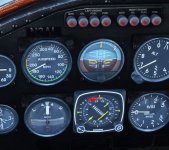
Issue Experienced: Autopilot heading bug is consistently ~3 degrees right of where the autopilot flies.
Expected Behaviour: Autopilot should hold the heading set.
Steps to Reproduce: In flight set heading bug, engage autopilot, select HDG mode.

BUG REPORT
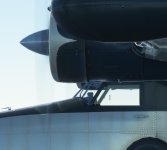
Issue Experienced: Cockpit side window doesn't meet the framing on the lower edge.
Expected Behaviour: Should fill window.
Steps to Reproduce: View exterior of aircraft.

BUG REPORT
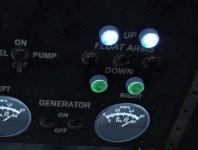
Issue Experienced: Right hand float switch not animated.
Expected Behaviour: Switch should move when clicked as the left hand one does.
Steps to Reproduce: Cycle float switches.

Nothing major and I'm sure you're already aware of it.
Few things I've noticed.
BUG REPORT
Issue Experienced: Autopilot heading bug is consistently ~3 degrees right of where the autopilot flies.
Expected Behaviour: Autopilot should hold the heading set.
Steps to Reproduce: In flight set heading bug, engage autopilot, select HDG mode.
BUG REPORT
Issue Experienced: Cockpit side window doesn't meet the framing on the lower edge.
Expected Behaviour: Should fill window.
Steps to Reproduce: View exterior of aircraft.
BUG REPORT
Issue Experienced: Right hand float switch not animated.
Expected Behaviour: Switch should move when clicked as the left hand one does.
Steps to Reproduce: Cycle float switches.
Nothing major and I'm sure you're already aware of it.
Attachments
Loving the Goose so far, using it to fly the Imperial Airways route from England to Australia and currently somewhere over the Med...
Few things I've noticed.
BUG REPORT
Issue Experienced: Autopilot heading bug is consistently ~3 degrees right of where the autopilot flies.
Expected Behaviour: Autopilot should hold the heading set.
Steps to Reproduce: In flight set heading bug, engage autopilot, select HDG mode.
BUG REPORT
Issue Experienced: Cockpit side window doesn't meet the framing on the lower edge.
Expected Behaviour: Should fill window.
Steps to Reproduce: View exterior of aircraft.
BUG REPORT
Issue Experienced: Right hand float switch not animated.
Expected Behaviour: Switch should move when clicked as the left hand one does.
Steps to Reproduce: Cycle float switches.
Nothing major and I'm sure you're already aware of it.
THANKYOU!

For being the only person to use the bug report format! Please report to our discord for Test Pilot status
Added to our Trello: https://trello.com/b/XrxlAg94/grumman-goose
Last edited:

Add some Grumman Ducks and you'll have an old grade-school children's game!Goose convention...


Sunny9850
SOH-CM-2024
I actually had to remove the Goose again from my Community folder since I have no clue as to how MSFS handles the AI aircraft at this point and while I generally believe you can't have too many round engines on any airport.....my PC disagreed and I had my first couple of CTDs 
The Goose is not at fault of course....I just need a more powerful PC
Cheers
Sunny
The Goose is not at fault of course....I just need a more powerful PC
Cheers
Sunny

